


最近节日
正在加载日历...----
第一个页面中可以修改创建工程的网址

a. https://start.spring.io 默认
b. https://start.springboot.io 备用1
c. https://start.aliyun.com 备用2
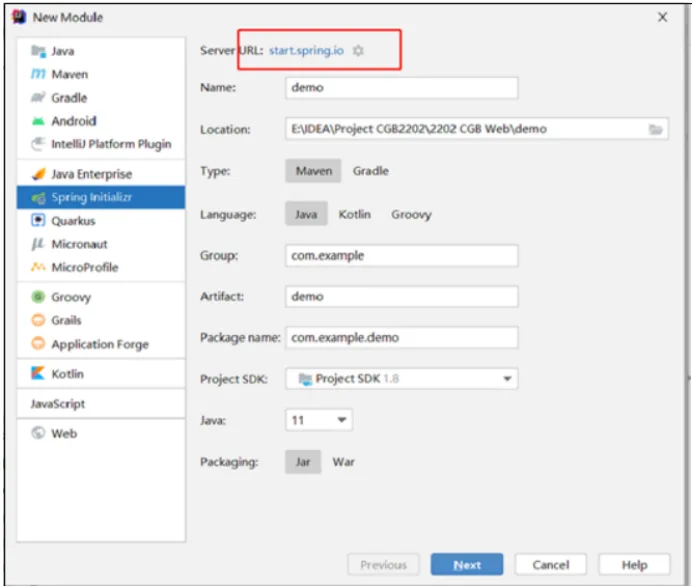
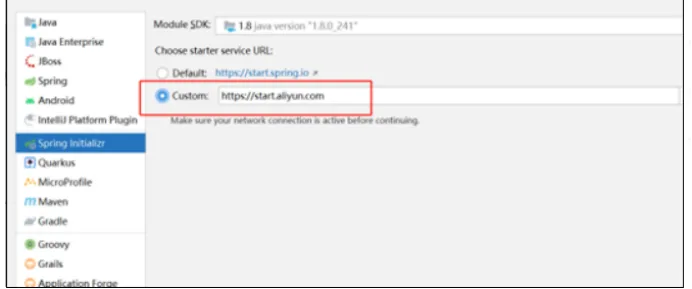

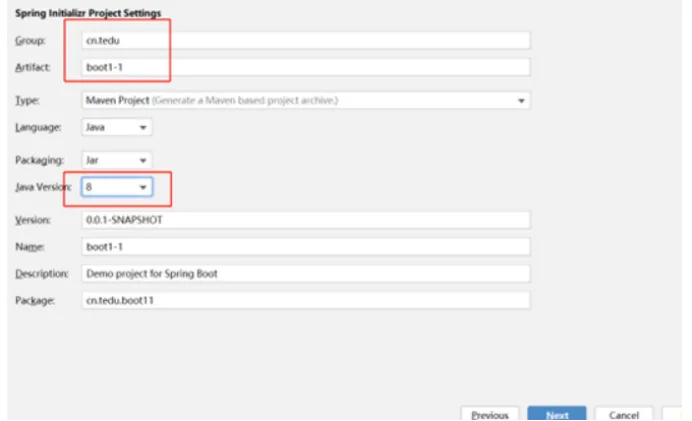
点击Finishi等待下载内容
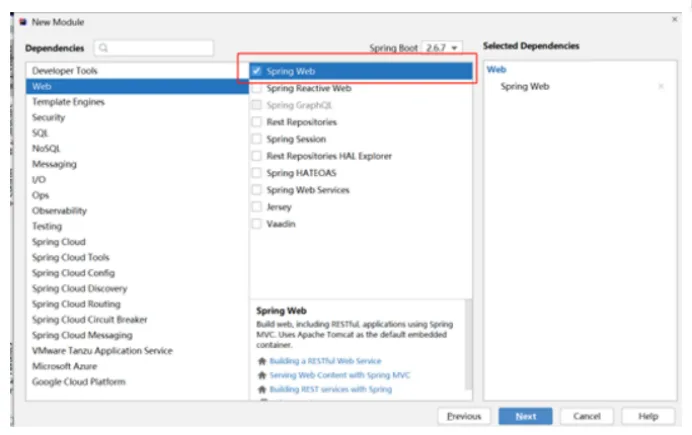
如何检查工程是否创建成功?
在idea的底部 找到Build 然后看里面是否出现绿色的对勾
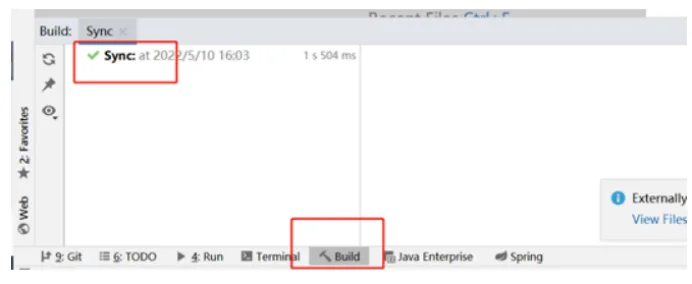
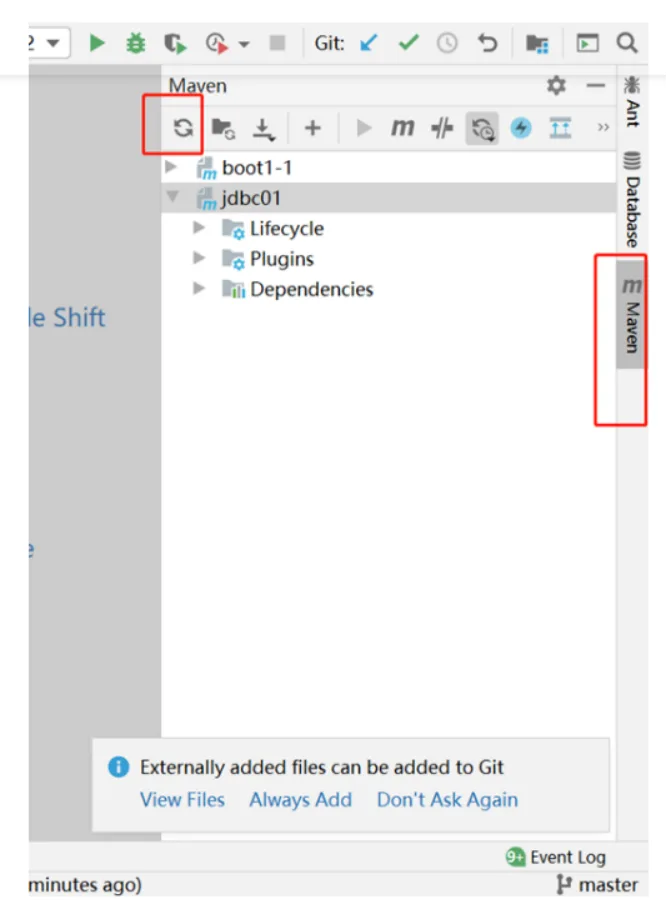
检查maven是否已经改成aliyun的配置文件(settings文件)
如果已经改成aliyun的 , 还有错的话 , 找到 .m2 文件夹下的repository文件夹删除 , 删除完之后再次重复第6步刷新maven
在工程的static文件夹中添加index.html , body中添加h1标签 , 页面中显示HelloSpringBoot , 启动工程通过浏览器访问http://localhost:8080 检查是否显示此页面
创建controller.HelloController类 , 在里面添加hello方法处理/hello请求 , 给客户端响应一句话 , 重启工程 , 浏览器访问http://localhost:8080/hello 测试是否成功
package cn.tedu.boot11.controller;
@Controller //标识这是controller层,并且创建对象交给Spring管理public class HelloController {
//localhost:8080/hello @RequestMapping("hello") //定义访问路径 public void hello(HttpServletResponse response) throws IOException { //设置响应的类型,告诉客户端服务器响应的是什么类型的内容和字符集 response.setContentType("text/html;charset=utf-8"); //得到输出对象 PrintWriter pw = response.getWriter(); //输出数据 pw.print("服务器接收到了请求!<h1>测试成功!</h1>"); //关闭资源 pw.close(); }}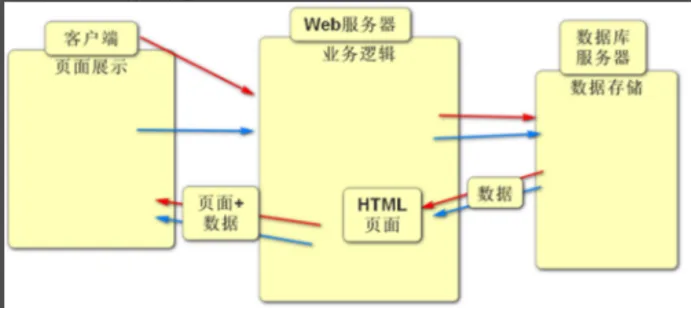
负责建立底层的网络连接
根据客户端请求的静态资源路径找到对应的静态资源文件并把该文件返回给客户端
举例:http://localhost:8080/index.html
根据客户端请求的动态资源路径找到对应的Controller里面的方法并且执行
Spring框架(第四阶段讲)
SpringMVC框架(第二阶段到第四阶段)
Mybatis框架(第三阶段到第四阶段)
通过浏览器的地址栏中发出请求
通过html页面中的超链接发出请求
通过html页面中的form表单发出请求
通过前端框架发出请求
package cn.tedu.boot21.controller;
@Controllerpublic class HelloController { /*@RequestMapping("hello") //定义此方法的访问路径 public void hello(HttpServletResponse response) throws IOException { //告诉客户端返回的数据类型 response.setContentType("text/html;charset=utf-8"); //获取输出对象 PrintWriter pw = response.getWriter(); pw.print("测试成功!"); pw.close(); }*/
@RequestMapping("hello") @ResponseBody //SpringMVC框架提供的注解,作用:可以通过返回值的方式给客户端响应数据 public String hello() { return "测试成功!222"; }
}<!DOCTYPE html><html lang="en"><head> <meta charset="UTF-8"> <title>Title</title></head><body><h1>工程首页</h1><h2>通过超链接发出请求</h2><!--localhost:8080/hello--><!--相对路径:相对于当前页面所处位置--><a href="hello">相对路径</a><!--******绝对路径1: 相对于工程的根路径 /代表工程根路径http://localhost:8080/--><a href="/hello">绝对路径1</a><!--绝对路径2,这种写法一般访问其它网站资源时使用--><a href="http://localhost:8080/hello">绝对路径2</a></body></html>package cn.tedu.boot21.controller;
@Controllerpublic class HelloController { /*@RequestMapping("hello") //定义此方法的访问路径 public void hello(HttpServletResponse response) throws IOException { //告诉客户端返回的数据类型 response.setContentType("text/html;charset=utf-8"); //获取输出对象 PrintWriter pw = response.getWriter(); pw.print("测试成功!"); pw.close(); }*/
@RequestMapping("hello") @ResponseBody //SpringMVC框架提供的注解,作用:可以通过返回值的方式给客户端响应数据 public String hello() { return "测试成功!222"; }
@RequestMapping("param1") @ResponseBody public String param1(HttpServletRequest request) { String info = request.getParameter("info"); return "接收到了参数:"+info; }
@RequestMapping("param2") @ResponseBody public String param2(String name,int age) { return "接收到了参数:"+name+"年龄:"+age; }
@RequestMapping("param3") @ResponseBody public String param3(Emp emp) { return emp.toString(); }
}<!DOCTYPE html><html lang="en"><head> <meta charset="UTF-8"> <title>Title</title></head><body> <h1>工程首页</h1> <h2>通过超链接发出请求</h2> <!-- localhost:8080/hello --> <!-- 相对路径:相对于当前页面的所处位置 --> <a href="hello">相对路径</a> <!-- 绝对路径1:相对于工程的根路径 /代表工程的根路径localhost:8080/ --> <a href="/hello">绝对路径1</a> <!-- 绝对路径2:这种写法一般访问是他的网站资源时使用 --> <a href="http://localhost:8080/hello">绝对路径2</a>
<h2>通过form表单发出请求</h2> <form action="/param1"> <input type="text" name="info"> <input type="submit"> </form>
<h2>第二种传参方式</h2> <form action="/param2"> <input type="text" name="name"> <input type="text" name="age"> <input type="submit"> </form>
<h2>第三种传参方式</h2> <form action="/param3"> <input type="text" name="name"> <input type="text" name="sal"> <input type="text" name="job"> <input type="submit"> </form></body></html>package cn.tedu.boot21.entity;//实体类,作用:用来存数据的类public class Emp { private String name; private double sal; private String job;
public String getName() { return name; }
public void setName(String name) { this.name = name; }
public double getSal() { return sal; }
public void setSal(double sal) { this.sal = sal; }
public String getJob() { return job; }
public void setJob(String job) { this.job = job; }
@Override public String toString() { return "Emp{" + "name='" + name + '\'' + ", sal=" + sal + ", job='" + job + '\'' + '}'; }}<!DOCTYPE html><html lang="en"><head> <meta charset="UTF-8"> <title>Title</title></head><body> <h1>注册页面</h1> <form action="/reg"> <input type="text" name="username" placeholder="用户名"> <input type="text" name="password" placeholder="密码"> <input type="text" name="nickname" placeholder="昵称"> <input type="submit" value="注册"> </form></body></html>package cn.tedu.boot21.controller;
@Controllerpublic class UserController { @RequestMapping("reg") @ResponseBody public String reg(User user) { return user.toString(); }}package cn.tedu.boot21.entity;
public class User { private Integer id; private String username; private String password; private String nickname;
public Integer getId() { return id; }
public void setId(Integer id) { this.id = id; }
public String getUsername() { return username; }
public void setUsername(String username) { this.username = username; }
public String getPassword() { return password; }
public void setPassword(String password) { this.password = password; }
public String getNickname() { return nickname; }
public void setNickname(String nickname) { this.nickname = nickname; }
@Override public String toString() { return "User{" + "id=" + id + ", username='" + username + '\'' + ", password='" + password + '\'' + ", nickname='" + nickname + '\'' + '}'; }}在pom.xml中添加 MySQL依赖和数据库连接池依赖 , 从jdbc01工程中去复制两个依赖粘贴到新工程中, 然后刷新maven(必须做)
把jdbc01工程中的DBUtils 复制到新工程的utils包(在boot21下新建此包)下面
package cn.tedu.boot21.controller;
@Controllerpublic class UserController { /*@RequestMapping("reg") @ResponseBody public String reg(User user) { return user.toString(); }*/
@RequestMapping("reg") @ResponseBody public String reg(User user) { //得到数据库连接 try(Connection conn = DBUtils.getConn()) { String sql = "select id from user where username = ?"; PreparedStatement ps = conn.prepareStatement(sql); ps.setString(1,user.getUsername()); ResultSet rs = ps.executeQuery(); if (rs.next()) { return "用户名已存在!"; } String insertSql = "insert into user values(null,?,?,?)"; PreparedStatement insertPs = conn.prepareStatement(insertSql); insertPs.setString(1,user.getUsername()); insertPs.setString(2,user.getPassword()); insertPs.setString(3,user.getNickname()); insertPs.executeUpdate(); } catch (SQLException e) { e.printStackTrace(); } return "注册成功!"; }
@RequestMapping("login") @ResponseBody public String login(User user) { try(Connection conn = DBUtils.getConn()) { String sql = "select password from user where username = ?"; PreparedStatement ps = conn.prepareStatement(sql); ps.setString(1,user.getUsername()); ResultSet rs = ps.executeQuery(); if (rs.next()) { //代表查询到了信息 if (rs.getString(1).equals(user.getPassword())) { return "登录成功!"; } return "密码错误"; } } catch (SQLException e) { e.printStackTrace(); } return "用户名不存在"; }}<!DOCTYPE html><html lang="en"><head> <meta charset="UTF-8"> <title>Title</title></head><body><h1>登录页面</h1><form action="/login"> <input type="text" name="username" placeholder="用户名"> <input type="password" name="password" placeholder="密码"> <input type="submit" value="登录"></form></body></html>