


最近节日
正在加载日历...----
把实现一个业务的代码划分为三部分 , 分别是 : 页面相关(V),业务逻辑相关(C),数据相关(M)

把实现一个业务的代码划分为三部分 , 分别是 : 页面相关(V),业务逻辑相关(C),数据相关(M)
M : Model 数据模型, 对应的代码是数据库相关的Mapper部分
V : View 视图, 对应所有页面相关内容
C : Controller 控制器, 对应的是Controller相关代码
实现一个业务的顺序 : V页面相关代码 -> C Controller相关代码 -> M 数据库Mapper相关代码
排错时也是从这三部分代码中找问题
后端MVC涉及模式中的V页面相关,前端工程师将页面又划分为了MVC三部分
将商品表的同步请求改为异步请求 , 将之前的操作成功显示到一个单独的页面修改为在操作界面中显示


创建boot4-1工程 , 添加3个依赖 , 修改application.properties配置文件, 启动工程测试是否成功
创建index.html首页 和 insert.html页面
在insert.html页面中添加三个文本框和一个添加按钮 , 通过Vue对页面内容进行管理 , 此时需要把之前工程中的js文件夹复制到新工程 , 当点击添加按钮时向/insert地址发出异步post请求把用户输入的商品信息提交
创建controller.ProductController , 添加insert方法处理/insert请求 , 创建Product实体类 , 在insert方法中声明用来接收传递过来的参数(此参数需要通过@RequestBody注解进行修饰)
创建ProductMapper , 在里面添加insert方法通过@Insert注解修饰
在Controller中将ProductMapper装配进来 , 在insert方法中调用mapper的insert方法把接收到的Product对象传递过去
<!DOCTYPE html><html lang="en"><head> <meta charset="UTF-8"> <title>Title</title></head><body> <h1>商品管理首页</h1> <a href="/insert.html">添加商品</a> <a href="/list.html">商品列表</a></body></html>将之前项目的js目录复制到新项目中
<!DOCTYPE html><html lang="en"><head> <meta charset="UTF-8"> <title>Title</title></head><body> <h1>添加商品</h1> <div> <input type="text" v-model="p.title" placeholder="商品标题"> <input type="text" v-model="p.price" placeholder="商品价格"> <input type="text" v-model="p.saleCount" placeholder="商品销量"> <input type="button" value="添加" @click="insert()"> </div> <script src="js/vue.js"></script> <script src="js/axios.min.js"></script> <script> let v = new Vue({ el : "div", data : { p : { title : "", price : "", saleCount : "" } }, methods : { insert() { //发出异步请求 axios.post("/insert",v.p).then(function (response) { alert("添加完成!"); location.href = "/"; }) }
}
}) </script></body></html><!DOCTYPE html><html lang="en"><head> <meta charset="UTF-8"> <title>Title</title></head><body> <h1>商品列表</h1> <table border="1"> <tr> <th>商品id</th> <th>商品标题</th> <th>商品价格</th> <th>商品销量</th> </tr> <tr v-for="p in arr"> <td>{{p.id}}</td> <td>{{p.title}}</td> <td>{{p.price}}</td> <td>{{p.saleCount}}</td> </tr> </table> <script src="js/vue.js"></script> <script src="js/axios.min.js"></script> <script> let v = new Vue({ el : "table", data : { arr : [] }, //此方法是Vue对象创建时执行的方法,一般会把加载完页面请求数据的代码,写在此方法中 created : function () { axios.get("/select").then(function (response) { //服务器返回的数据直接赋值给arr数组,由于页面和数组进行了绑定,数组值发生变化时,页面会自动发生变化
//服务器传递过来的就是二进制的数据,先将二进制的数据转换为JSON格式的字符串, //转换完成后,Axios框架会将JSON格式的数据转换为数组或对象 v.arr = response.data; }) } }) </script></body></html>package cn.tedu.boot41.controller;
import java.util.List;
@RestControllerpublic class ProductController {
@Autowired ProductMapper mapper;
@RequestMapping("insert") public void insert(@RequestBody Product product) { System.out.println("product="+product); mapper.insert(product); }
@RequestMapping("select") public List<Product> select() { List<Product> list = mapper.select(); //SpringMVC框架将返回值类型为集合以及对象的数据,会将此类型的数据转换为 //JSON格式的字符串,然后再将JSON格式的字符串转换为二进制数据在网络中进行传输 return list; }}package cn.tedu.boot41.entity;
public class Product { private Integer id; private String title; private Double price; private Integer saleCount;
public Integer getId() { return id; }
public void setId(Integer id) { this.id = id; }
public String getTitle() { return title; }
public void setTitle(String title) { this.title = title; }
public Double getPrice() { return price; }
public void setPrice(Double price) { this.price = price; }
public Integer getSaleCount() { return saleCount; }
public void setSaleCount(Integer saleCount) { this.saleCount = saleCount; }
@Override public String toString() { return "Product{" + "id=" + id + ", title='" + title + '\'' + ", price=" + price + ", saleCount=" + saleCount + '}'; }}package cn.tedu.boot41.mapper;
@Mapperpublic interface ProductMapper { @Insert("insert into product values(null,#{title},#{price},#{saleCount})") void insert(Product product);
@Select("select * from product") @Result(property = "saleCount",column = "sale_count") List<Product> select();}JSON是一种轻量级的数据交换格式(数据封装格式)
客户端和服务器之间需要互相传递数据,当需要传递复杂数据时需要按照特定的格式将数据进行封装,JSON就是这样一个通用格式.
[{"id":1,"title":"阿迪袜子","price":10.0,"saleCount":1000},{"id":3,"title":"裤子","price":50.0,"saleCount":400},{"id":4,"title":"袜子","price":5.0,"saleCount":100}]服务器和客户端之间如何传递复杂数据

<!DOCTYPE html><html lang="en"><head> <meta charset="UTF-8"> <title>Title</title></head><body> <h1>商品列表</h1> <table border="1"> <tr> <th>商品id</th> <th>商品标题</th> <th>商品价格</th> <th>商品销量</th> <th>操作</th> </tr> <tr v-for="p in arr"> <td>{{p.id}}</td> <td>{{p.title}}</td> <td>{{p.price}}</td> <td>{{p.saleCount}}</td> <!-- 废掉超链接自身的跳转功能 --> <td> <a href="javascript:void(0)" @click="del(p.id)">删除</a> </td> </tr> </table> <script src="js/vue.js"></script> <script src="js/axios.min.js"></script> <script> let v = new Vue({ el : "table", data : { arr : [] }, //此方法是Vue对象创建时执行的方法,一般会把加载完页面请求数据的代码,写在此方法中 created : function () { axios.get("/select").then(function (response) { //服务器返回的数据直接赋值给arr数组,由于页面和数组进行了绑定,数组值发生变化时,页面会自动发生变化
//服务器传递过来的就是二进制的数据,先将二进制的数据转换为JSON格式的字符串, //转换完成后,Axios框架会将JSON格式的数据转换为数组或对象 v.arr = response.data; }) }, methods : { del(id) { //发出删除的异步请求 axios.get("/delete?id="+id).then(function (response){ alert("删除成功!"); location.reload(); //刷新页面 }) } } }) </script></body></html>@RequestMapping("/delete")public void delete(int id){ mapper.deleteById(id);}@Delete("delete from product where id=#{id}")void deleteById(int id);在商品列表页面中添加删除的超链接 ,废掉超链接的跳转功能添加点击事件,调用del方法, 在方法中向/delete发出异步get请求并且把商品的id传递过去
在ProductController中 添加delete方法处理/delete请求在方法中调用mapper的deleteById方法把接收到的id传递进去
实现mapper里面的deleteById方法
<!--废掉超链接自身的跳转功能--><td><a href="javascript:void(0)" @click="del(p.id)">删除</a> <!--点击修改需要跳转页面 所以不能像删除一样废掉跳转功能--> <!--元素的属性里面出现变量,必须加冒号 需要进行属性绑定--> <a :href="'/update.html?id='+p.id">修改</a></td><!DOCTYPE html><html lang="en"><head> <meta charset="UTF-8"> <title>Title</title></head><body><h1>修改商品页面</h1><div> <!--readonly设置为只读--> <input type="text" v-model="product.id" placeholder="id" readonly> <input type="text" v-model="product.title" placeholder="标题"> <input type="text" v-model="product.price" placeholder="价格"> <input type="text" v-model="product.saleCount" placeholder="销量"> <input type="button" value="修改" @click="update()"></div><script src="js/vue.js"></script><script src="js/axios.min.js"></script><script> let v = new Vue({ el:"div", data:{ product:{} }, created:function () { //页面加载完之后 得到商品的id 通过id查询商品信息 并显示到页面中 //从地址栏中得到id参数,location.search获取'?id=1',split("=")[1]根据"="拆分并获取后半部分 let id = location.search.split("=")[1]; //发出异步请求通过id查询对应的商品信息 axios.get("/selectById?id="+id).then(function (response) { //把服务器查询回来的商品信息赋值给Vue里面的product变量 //让页面和product对象进行绑定 当product得到值页面就会显示出来 v.product = response.data; }) }, methods:{ update(){ //发出异步post请求 axios.post("/update",v.product).then(function (response) { alert("修改完成!"); location.href="/list.html"; }) } } })</script></body></html>@RequestMapping("/selectById")public Product selectById(int id){ System.out.println("id = " + id); //当SpringMVC框架发现返回的是一个自定义对象会自动转成JSON字符串再转成二进制进行网络传输 return mapper.selectById(id); }
@RequestMapping("/update")public void update(@RequestBody Product product){ mapper.update(product);}@Select("select * from product where id=#{id}")@Result(property = "saleCount",column = "sale_count")Product selectById(int id);
@Update("update product set title=#{title},price=#{price},sale_count=#{saleCount} where id=#{id}")void update(Product product);给列表页面添加 修改超链接 往/update.html页面跳转 并且传递过去商品id
创建update.html页面 在Vue的created方法中得到传递过来的id 然后向/selectById 发出异步的get请求 把id传递过去 把服务返回的数据用一个product对象接收, 并且页面内容和此对象进行绑定 这样对象有值页面就能跟着显示
在ProductController里面添加selectById方法 处理/selectById请求, 在方法中调用Mapper的selectById方法
实现mapper里面的selectById方法
给update.html页面中的修改按钮添加点击事件, 点击时向/update地址发出异步的post请求把商品的信息一起提交
在ProductController里面添加update方法处理/update请求,在方法中调用mapper的update方法
实现mapper里面的update方法 .
创建boot4-2工程 , 添加3个依赖 , 修改application.properties配置文件, 启动工程测试是否成功
在static目录下复制两个文件夹js和css文件夹(已经上传)
index.html
<!DOCTYPE html><html lang="en"><head> <meta charset="UTF-8"> <title>Title</title></head><body><h1>文件上传测试</h1><a href="/upload.html">文件上传页面</a></body></html>#设置文件上传大小的限制spring.servlet.multipart.max-file-size=10MB复制HelloEUI.html模板到新项目中,改名为upload.html,并进行修改
<!DOCTYPE html><html lang="en"><head> <meta charset="UTF-8"> <title>Title</title> <link rel="stylesheet" href="css/eui.css"></head><body><div id="app"> <el-upload action="/upload" name="picFile" list-type="picture-card" :on-preview="handlePictureCardPreview" :on-remove="handleRemove"> <i class="el-icon-plus"></i> </el-upload> <el-dialog :visible.sync="dialogVisible"> <img width="100%" :src="dialogImageUrl" alt=""> </el-dialog></div></body><!-- import Vue before Element --><script src="js/vue.js"></script><!-- import JavaScript --><script src="js/eui.js"></script><script src="js/axios.min.js"></script><script> let v = new Vue({ el: '#app', data: function() { return { dialogImageUrl: '', dialogVisible: false } }, methods: { handleRemove(file, fileList) { console.log(file, fileList); //当点击删除图片时,会执行handleRemove方法 //file代表要删除的文件,file.response代表文件上传成功后,服务器响应的数据(文件名) console.log("文件名="+file.response); //http://localhost:8080/remove?name=xxx.jpg axios.get("/remove?name="+file.response).then(function (response) { console.log("服务器图片已经删除!") }) }, handlePictureCardPreview(file) { this.dialogImageUrl = file.url; this.dialogVisible = true; } } })</script></html>package cn.tedu.boot42.controller;
import org.springframework.web.bind.annotation.RequestMapping;import org.springframework.web.bind.annotation.RestController;import org.springframework.web.multipart.MultipartFile;
import java.io.File;import java.io.IOException;import java.util.UUID;
@RestControllerpublic class UploadController {
@RequestMapping("upload") public String upload(MultipartFile picFile) throws IOException { System.out.println(picFile); //得到文件原始文件名 b.jpg String filename = picFile.getOriginalFilename(); //得到后缀名 从最后一个"."出现的位置截取到最后 String suffix = filename.substring(filename.lastIndexOf(".")); //得到唯一的文件名 UUID.randomUUID()得到一个唯一的标识符 filename = UUID.randomUUID() + suffix; System.out.println("文件名:"+filename); //准备保存图片的文件夹路径 String dirPath = "D:/files"; File dirFile = new File(dirPath); //如果文件夹不存在,则创建此文件夹 if (!dirFile.exists()) { dirFile.mkdirs(); //创建文件夹 } //得到文件的完整路径 String filePath = dirPath+"/"+filename; //把文件保存到此路径中 picFile.transferTo(new File(filePath)); System.out.println("文件保存成功!请去此路径查看文件是否存在:"+filePath); return filename; //返回名字是因为删除需要用到这个名字 }
@RequestMapping("remove") public void remove(String name) { String filePath = "D:/files/"+name; new File(filePath).delete(); //删除文件 }}创建boot5-1工程 添加三个依赖
配置文件中添加以下内容(empdb改成weibo) ,并启动工程检查是否能够成功运行
spring.datasource.username=rootspring.datasource.password=rootspring.datasource.url=jdbc:mysql://localhost:3306/weibo?characterEncoding=utf8&serverTimezone=Asia/Shanghai&useSSL=false
#设置文件上传大小的限制spring.servlet.multipart.max-file-size=10MBcreate database weibo charset=utf8;
use weibo;
create table user(id int primary key auto_increment,username varchar(50),password varchar(50),nickname varchar(50))charset=utf8;
create table weibo(id int primary key auto_increment,content varchar(100),url varchar(255),nickname varchar(50),created timestamp,user_id int)charset=utf8;<!DOCTYPE html><html lang="en"><head> <meta charset="UTF-8"> <title>Title</title></head><body><h1>微博首页</h1> <div> <a href="/reg.html">注册</a> <a href="/login.html">登录</a> </div>
</body></html><!DOCTYPE html><html lang="en"><head> <meta charset="UTF-8"> <title>Title</title></head><body><h1>注册页面</h1><div> <input type="text" v-model="user.username" placeholder="用户名"> <input type="text" v-model="user.password" placeholder="密码"> <input type="text" v-model="user.nickname" placeholder="昵称"> <input type="button" value="注册" @click="reg()"></div><script src="js/vue.js"></script><script src="js/axios.min.js"></script><script> let v = new Vue({ el:"div", data:{ user:{ username:"", password:"", nick:"" } }, methods:{ reg(){ //发出注册请求 axios.post("/reg",v.user).then(function (response) { if (response.data==1){ alert("注册成功!"); location.href="/"; }else{ alert("用户名已存在!"); }
}) } } })</script>
</body></html>package cn.tedu.boot51.controller;
@RestControllerpublic class UserController { @Autowired(required = false) UserMapper mapper;
@RequestMapping("/reg") public int reg(@RequestBody User user){ System.out.println("user = " + user); User u = mapper.selectByUsername(user.getUsername()); if (u!=null){ return 2;//代表用户名已存在 } mapper.insert(user);//注册 return 1; }}package cn.tedu.boot51.mapper;
@Mapperpublic interface UserMapper { @Select("select * from user where username=#{username}") User selectByUsername(String username);
@Insert("insert into user values(null,#{username},#{password},#{nickname})") void insert(User user);
}<!DOCTYPE html><html lang="en"><head> <meta charset="UTF-8"> <title>Title</title></head><body><h1>登录页面</h1><div> <input type="text" v-model="user.username" placeholder="用户名"> <input type="password" v-model="user.password" placeholder="密码"> <input type="button" value="登录" @click="login()"></div><script src="js/vue.js"></script><script src="js/axios.min.js"></script><script> let v = new Vue({ el:"div", data:{ user:{username:"",password:""} }, methods:{ login(){ axios.post("/login",v.user).then(function (response) { if (response.data==1){ alert("登录成功!"); location.href="/"; }else if(response.data==2){ alert("用户名不存在!"); }else{ alert("密码错误!"); } }) } } })</script></body></html>package cn.tedu.boot51.controller;
@RestControllerpublic class UserController { @Autowired(required = false) UserMapper mapper;
@RequestMapping("/login") public int login(@RequestBody User user){ System.out.println("user = " + user); User u = mapper.selectByUsername(user.getUsername()); if (u!=null){ if (user.getPassword().equals(u.getPassword())){ //user代表用户输入的信息包括:用户名和密码 //u代表从数据库中查询到的信息 包括: id,用户名和密码,昵称 return 1;//登录成功 } return 3; //密码错误 } return 2;//用户名不存在 }}<!DOCTYPE html><html lang="en"><head> <meta charset="UTF-8"> <title>Title</title></head><body> <h1>微博首页</h1> <div> <div v-if="isLogin"> <p>欢迎{{user.nickname}}回来!</p> <a href="/insert.html">发布微博</a> <a href="javascript:void(0)" @click="logout()">登出</a> </div> <div v-else> <a href="/reg.html">注册</a> <a href="/login.html">登录</a> </div> </div> <script src="js/vue.js"></script> <script src="js/axios.min.js"></script> <script> let v = new Vue({ el:"body>div", data:{ isLogin:false, user:{nickname:"刘德华"} }, created:function (){ axios.get("/currentUser").then(function (response) { v.user = response.data; //如果当前客户端没有登录的话得到的是空字符串"", //如果是空字符串代表还没有登录,isLogin=false,如果不是空字符串,则代表登录成功了 v.isLogin = v.user==""?false:true; }) }, methods:{ logout(){ //发出退出登录的请求 axios.get("/logout").then(function (response) { location.reload(); //刷新页面 }) } } }) </script></body></html>package cn.tedu.boot51.controller;
import cn.tedu.boot51.entity.User;import cn.tedu.boot51.mapper.UserMapper;import org.springframework.beans.factory.annotation.Autowired;import org.springframework.web.bind.annotation.RequestBody;import org.springframework.web.bind.annotation.RequestMapping;import org.springframework.web.bind.annotation.RestController;
import javax.servlet.http.HttpSession;
@RestControllerpublic class UserController { @Autowired(required = false) UserMapper mapper;
@RequestMapping("/reg") public int reg(@RequestBody User user){ System.out.println("user = " + user); User u = mapper.selectByUsername(user.getUsername()); if (u!=null){ return 2;//代表用户名已存在 } mapper.insert(user);//注册 return 1; }
//在参数列表中声明session对象,即可得到当前客户端对应的session(一个登录用户对应一个session) @RequestMapping("/login") public int login(@RequestBody User user, HttpSession session){ System.out.println("user = " + user); User u = mapper.selectByUsername(user.getUsername()); if (u!=null){ if (user.getPassword().equals(u.getPassword())){ //user代表用户输入的信息包括:用户名和密码 //u代表从数据库中查询到的信息 包括: id,用户名和密码,昵称 //把当前登录的用户信息保存在会话对象(session)中 session.setAttribute("user",u); return 1;//登录成功 } return 3; //密码错误 } return 2;//用户名不存在 }
@RequestMapping("currentUser") public User currentUser(HttpSession session) { //从会话对象中得到登录成功后的保存的用户对象 return (User) session.getAttribute("user"); }
@RequestMapping("logout") public void logout(HttpSession session) { session.removeAttribute("user"); }}在登录成功时把当前客户端登录的user用户对象保存到当前客户端所对应的Session对象里面
每个客户端进入到首页index.html时会立即发请求获取当前客户端登录的用户对象 , 服务器接收到请求后会从当前客户端所对应的Session对象里面获取曾经保存过的用户对象(前提是登陆过) , 如果没有登录直接获取得到的是null返回给客户端 , 此时客户端得到的是""空字符串 , 客户端判断是否是空字符来表示是否登录过 , 通过给isLogin赋值true或false来控制页面显示的内容
客户端和服务器之间进行数据传输遵循的是HTTP协议 , 此协议属于无状态协议(一次请求对应一次响应,响应完之后链接就会断开) 服务器是无法跟踪客户端的请求 , 通过Cookie服务器可以给客户端添加一个标识 , 当客户端再次发出请求时会带着这个Cookie这样服务器就能识别此客户端了, 但是由于Cookie是保存在客户端的存在被篡改的风险 , Session的出现解决了此问题
Cookie : 打孔式会员卡 , 数据保存在客户端
Session : 相当于银行账户 , 数据保存在服务器内存中(工程重新启动会清空所有Session)
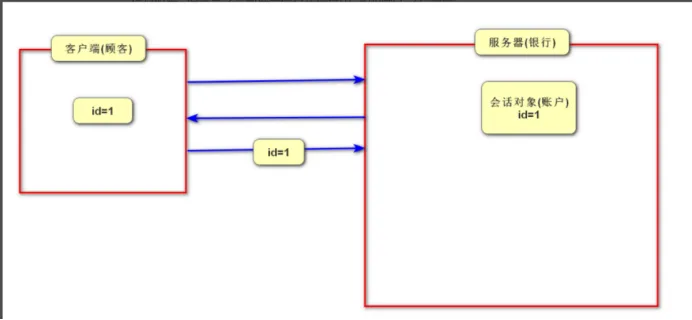
首先整个复制4-2中上传图片的代码(upload),也需要将UploadController复制过来
<!DOCTYPE html><html><head> <meta charset="UTF-8"> <!-- import CSS --> <link rel="stylesheet" href="css/eui.css"></head><body><h1>发布微博页面</h1><div id="app"> <input type="text" v-model="weibo.content" placeholder="说点儿什么..."> <!-- name代表文件上传时,文件的参数名 :limit="1"设置只能选择一张图片 --> <el-upload action="upload" name = "picFile" :limit="1" list-type="picture-card" :on-preview="handlePictureCardPreview" :on-success="handleSuccess" :on-remove="handleRemove"> <i class="el-icon-plus"></i> </el-upload> <el-dialog :visible.sync="dialogVisible"> <img width="100%" :src="dialogImageUrl" alt=""> </el-dialog> <input type="button" value="发布微博" @click="insert()"></div></body><!-- import Vue before Element --><script src="js/vue.js"></script><!-- import JavaScript --><script src="js/eui.js"></script><script src="js/axios.min.js"></script><script> let v = new Vue({ el: '#app', data: function() { return { dialogImageUrl: '', dialogVisible: false, weibo:{ content:"", url:"" } } }, methods: { handleRemove(file, fileList) { /*file表示要删除的文件 * file.response代表是文件上传成功后,服务器响应的数据(文件名)*/ console.log(file, fileList); axios.get("/remove?name="+file.response).then(function (response){ alert("服务器图片删除成功!") } ) }, handlePictureCardPreview(file) { this.dialogImageUrl = file.url; this.dialogVisible = true; }, insert() { if (v.weibo.content.trim()==""||v.weibo.url=="") { alert("微博内容或者图片不能为空!") return; } axios.post("/insert",v.weibo).then(function (response) { alert("添加成功!"); location.href="/"; }) }, handleSuccess(response,file, fileList) { //response = file.response console.log("文件上传成功后,图片名="+response); v.weibo.url = response; } } })</script></html>package cn.tedu.boot51.controller;
@RequestMapping("insert") public int insert(@RequestBody Weibo weibo, HttpSession session) { //得到当前登录的用户对象 User u = (User) session.getAttribute("user"); if(u == null) { return 2; //表示未登录 } //new Date()得到当前的系统时间 weibo.setCreated(new Date()); //把已经登录的用户信息,添加到微博对象中 weibo.setUserId(u.getId()); weibo.setNickname(u.getNickname()); System.out.println("weibo : "+weibo); mapper.insert(weibo); //未完待续 return 1; }package cn.tedu.boot51.entity;
import java.util.Date;
public class Weibo { private Integer id; private String content; private String url; private String nickname;//发布微博的作者名字 private Date created; //发布微博的日期 private Integer userId; //发布微博作者的用户id
public Integer getId() { return id; }
public void setId(Integer id) { this.id = id; }
public String getContent() { return content; }
public void setContent(String content) { this.content = content; }
public String getUrl() { return url; }
public void setUrl(String url) { this.url = url; }
public String getNickname() { return nickname; }
public void setNickname(String nickname) { this.nickname = nickname; }
public Date getCreated() { return created; }
public void setCreated(Date created) { this.created = created; }
public Integer getUserId() { return userId; }
public void setUserId(Integer userId) { this.userId = userId; }
@Override public String toString() { return "Weibo{" + "id=" + id + ", content='" + content + '\'' + ", url='" + url + '\'' + ", nickname='" + nickname + '\'' + ", created=" + created + ", userId=" + userId + '}'; }}@Mapperpublic interface WeiboMapper { @Insert("insert into weibo values (null,#{content},#{url},#{nickname},#{created},#{userId})") void insert(Weibo weibo);}<!DOCTYPE html><html lang="en"><head> <meta charset="UTF-8"> <title>Title</title></head><body> <h1>微博首页</h1><div> <div v-if="isLogin"> <!-- 如果登录后,显示此内容 --> <p>欢迎{{user.nickname}}回来!</p> <a href="insert.html">发布微博</a> <a href="javascript:void(0)" @click="logout()">登出</a> </div> <div v-else> <!-- 如果未登录,显示此内容 --> <a href="reg.html">注册</a> <a href="login.html">登录</a> </div> <hr> <div v-for="weibo in arr"> <h3>{{weibo.nickname}}说:{{weibo.content}}</h3> <img :src="weibo.url" width="100"> </div></div>
<script src="js/vue.js"></script> <script src="js/axios.min.js"></script> <script> let v = new Vue({ el:"body>div", data:{ isLogin:false, user:{nickname:"TH"}, arr:[] }, created:function (){ //发送请求获取当前登录的用户信息 axios.get("currentUser").then(function (response) { v.user = response.data; v.isLogin = v.user == "" ? false : true; }), axios.get("select").then(function (response) { v.arr = response.data; }) }, methods:{ logout(){ axios.get("logout").then(function (response){ location.reload(); //刷新页面 }) } } }) </script></body></html>@RequestMapping("select")public List<Weibo> select() { return mapper.select();}@Select("select id,content,url,nickname from weibo order by created desc")List<Weibo> select();需要将图片展示到页面中,由于浏览器无法直接访问磁盘,所以需要修改静态资源文件夹
#配置静态资源文件夹 默认是static文件夹 classpath:static代表默认的spring.web.resources.static-locations=file:F:/files,classpath:static创建coolshark项目, 选中三个依赖
从上一个工程中复制application.propertise 里面所有内容到新工程 , 然后停掉之前工程 , 运行新工程测试是否能够正常启动(如果不能启动 , 删除工程重新创)
添加3个文件夹和4个页面(已经上传) , 添加完之后Rebuild工程 , 然后运行工程访问首页检查是否正常显示
修改application.propertise里面数据库的名字为cs
建库建表
create database cs charset=utf8;
use cs;
create table user(id int primary key auto_increment,username varchar(50),password varchar(50),nickname varchar(50))charset=utf8;
insert into user values(null,'admin','123456','管理员'); a. 修改登录页面 , 给按钮添加点击事件 , 添加axios引入及login声明方法 , 点击时向/login发出请求
<!DOCTYPE html><html><head> <meta charset="UTF-8"> <!-- import CSS --> <link rel="stylesheet" href="css/eui.css"> <style> body{ margin: 0; background-image: url("imgs/bg.jpg"); background-size: cover;/*cover是专门用来设置全屏背景的*/ text-align: center; } h1{ font-size: 72px; color: rgb(0,150,215); margin-bottom: 0; } img{ width: 100px; } h2{ font-size: 32px; color: #0095d7; margin:0; }
</style></head><body><div id="app"> <h1>欢迎来到酷鲨商城</h1> <img src="imgs/shark.png" alt=""> <h2>CoolSharkMall</h2> <el-card style="width: 600px;height: 300px; margin: 0 auto;background-color: rgba(255,255,255,0.3)"> <el-form style="width: 400px;margin: 30px auto" label-width="60px" > <el-form-item label="用户名"> <el-input type="text" v-model="user.username" placeholder="请输入用户名"></el-input> </el-form-item> <el-form-item label="密码"> <el-input type="password" v-model="user.password" placeholder="请输入密码"></el-input> </el-form-item> <el-form-item> <el-button style="position: relative;right: 35px" type="primary" @click="login()">登录</el-button> </el-form-item> </el-form> </el-card></div></body><!-- import Vue before Element --><script src="js/vue.js"></script><!-- import JavaScript --><script src="js/eui.js"></script><script src="js/axios.min.js"></script><script> let v = new Vue({ el: '#app', data: function() { return { user:{ username:"", password:"" } } }, methods:{ login() { axios.post("login",v.user).then(function (response) { if (response.data==1) { location.href="/admin.html"; }else if(response.data==2) { v.$message.error("用户名不存在"); }else { v.$message.error("密码错误"); } }) } } })</script></html> b. 创建UserController , 添加login方法处理/login请求
package cn.tedu.coolshark.controller;
@RestControllerpublic class UserController { @Autowired UserMapper mapper;
@RequestMapping("login") public int login(@RequestBody User user, HttpSession session) { User u = mapper.selectByUserName(user.getUsername()); if(u != null) { if (u.getPassword().equals(user.getPassword())) { session.setAttribute("user",u); return 1; //登陆成功 } return 3; //密码错误 } return 2; //用户名不存在 }} c. 创建User实体类
package cn.tedu.coolshark.entity;
public class User { private Integer id; private String username; private String password; private String nickname;
public Integer getId() { return id; }
public void setId(Integer id) { this.id = id; }
public String getUsername() { return username; }
public void setUsername(String username) { this.username = username; }
public String getPassword() { return password; }
public void setPassword(String password) { this.password = password; }
public String getNickname() { return nickname; }
public void setNickname(String nickname) { this.nickname = nickname; }
@Override public String toString() { return "User{" + "id=" + id + ", username='" + username + '\'' + ", password='" + password + '\'' + ", nickname='" + nickname + '\'' + '}'; }} d. 创建UserMapper 添加 登录相关方法
package cn.tedu.coolshark.mapper;
@Mapperpublic interface UserMapper { @Select("select * from user where username = #{username}") User selectByUserName(String username);}首页分类展示功能步骤:
a. 创建表和准备数据
create table category(id int primary key auto_increment,name varchar(50))charset=utf8;
insert into category values(null,"男装"),(null,"女装"),(null,"医药"),(null,"美食"),(null,"百货"),(null,"数码"); b. 创建Category实体类
package cn.tedu.coolshark.entity;
public class Category { private Integer id; private String name;
@Override public String toString() { return "Category{" + "id=" + id + ", name='" + name + '\'' + '}'; }
public Integer getId() { return id; }
public void setId(Integer id) { this.id = id; }
public String getName() { return name; }
public void setName(String name) { this.name = name; }} c. 创建CategoryMapper,里面提供select方法
@Mapperpublic interface CategoryMapper { @Select("select * from category") List<Category> select();} d. 创建CategoryController 里面添加select方法处理/category/select
@RestControllerpublic class CategoryController { @Autowired(required = false) CategoryMapper mapper;
@RequestMapping("/category/select") public List<Category> select(){ return mapper.select(); }} e. 在首页index.html页面中的created方法中向/category/select发出请求获取所有分类信息, 把查询到的数据赋值给一个数组变量 , 让页面中显示分类的地方 和数组进行绑定 通过v-for指令显示出所有分类信息
<!DOCTYPE html><html><body><div id="app"> <!--蓝色导航条开始--> <div style="width: 100%;height: 60px;background-color: #82c8ec"> <el-menu style="width: 1200px;margin: 0 auto" class="el-menu-demo" mode="horizontal" @select="handleSelect" background-color="#82c8ec" text-color="#fff" active-text-color="#fff"> <el-menu-item v-for="c in categoryArr" :index="c.id+''">{{c.name}}</el-menu-item> </el-menu></div></body><!-- import Vue before Element --><script src="js/vue.js"></script><!-- import JavaScript --><script src="js/eui.js"></script><script src="js/axios.min.js"></script><script> let v = new Vue({ el: '#app', data: function() { return { categoryArr:[] bannerArr:[], topArr:[], productArr:[], wd:"" } }, created:function () { //自动发请求获取所有分类信息 axios.get("/category/select").then(function (response) { v.categoryArr = response.data; }) }, methods:{ handleSelect(index){ console.log(index); } } })</script></html> a. 创建保存轮播图的表和轮播图数据
create table banner(id int primary key auto_increment,url varchar(255))charset=utf8;
insert into banner values(null,'/imgs/b1.jpg'),(null,'/imgs/b2.jpg'),(null,'/imgs/b3.jpg'),(null,'/imgs/b4.jpg'); b. 在首页index.html页面中的created方法里面向/banner/select发出请求把得到的数据赋值给vue里面的 bannerArr数组
//发出请求获取所有轮播图信息axios.get("/banner/select").then(function (response) { v.bannerArr = response.data;})c. 创建BannerController 添加select方法处理/banner/select请求
@RequestMapping("/banner/select")public List<Banner> select(){ return mapper.select();}d. 创建Banner实体类
package cn.tedu.coolshark.entity;
public class Banner { private Integer id; private String url;
@Override public String toString() { return "Banner{" + "id=" + id + ", url='" + url + '\'' + '}'; }
public Integer getId() { return id; }
public void setId(Integer id) { this.id = id; }
public String getUrl() { return url; }
public void setUrl(String url) { this.url = url; }}e. 创建BannerMapper 里面提供select方法
@Select("select * from banner")List<Banner> select();在admin.html页面中先引入 axios框架
在页面中添加created方法 在里面向/category/select发请求获取所有分类数据, 把得到的数据赋值给categoryArr数组,页面会自动展示
created:function () { //自动发请求获取所有分类信息 axios.get("/category/select").then(function (response) { v.categoryArr = response.data; })} <el-popconfirm @confirm="categoryDelete(scope.$index, scope.row)" title="这是一段内容确定删除吗?">categoryDelete(index,category){ axios.get("/category/delete?id="+category.id).then(function () { <!-- location.reload();刷新会发起多重请求,并回到类目页面 --> v.categoryArr.splice(index,1); }) }@RequestMapping("/category/delete")public void delete(int id ){ mapper.deleteById(id);}@Delete("delete from category where id=#{id}")void deleteById(int id);//弹出输入框v.$prompt("请输入分类名称","提示",{confirmButtonText:"确定",cancelButtonText:"取消"}).then(function (object) { console.log("分类名称:"+ object.value);})then(function (object) { console.log("分类名称:"+ object.value); let name = object.value; if (name==null||name.trim()==""){ v.$message.error("分类名称不能为空"); return; } axios.get("/category/insert?name="+name).then(function (response) { location.reload(); })}).catch(function(){ console.log("取消了");})@RequestMapping("/category/insert")public void insert(Category category){ mapper.insert(category);}@Insert("insert into category values(null,#{name})")void insert(Category category);axios.get("banner/select").then(function (response) { v.bannerArr = response.data;})<!--confirm确认事件--><el-popconfirm @confirm="bannerDelete(scope.$index, scope.row)" title="这是一段内容确定删除吗?"> <el-button size="mini" type="danger" slot="reference">删除</el-button> </el-popconfirm> bannerDelete(index,banner){ axios.get("/banner/delete?id="+banner.id).then(function () { <!-- location.reload();刷新会发起多重请求,并回到类目页面 --> v.bannerArr.splice(index,1); })}@RequestMapping("/banner/delete") public void delete(int id){ mapper.deleteById(id); }@Delete("delete from banner where id=#{id}")void deleteById(int id);@RequestMapping("/banner/delete") public void delete(int id){ //先查询到轮播图的url String url = mapper.selectUrlById(id); // aaa.jpg F:/files/aaa.jpg //得到文件的完整磁盘路径 String filePath = "D:/files/"+url; //创建文件对象并删除 new File(filePath).delete();
mapper.deleteById(id);}